
Email Is a Postcard: A Plain-Language Primer for Therapists on Encryption, Canadian Servers, and Secure Client Messaging
%20better%20res.jpg)
This post is for general education only. It isn't legal advice or clinical supervision, and I don't speak for CRPO or the IPC. Please read the linked sources and consult your college, legal counsel, or supervisor about your own situation. A full scope note appears at the end.
If you have ever attached a file called Week3_Grief_Homework.pdf to an email, hovered over Send, and felt a small flicker of something, this post is for you.
That flicker is your clinical instinct doing its job.
Emailing clients worksheets, session summaries, and between-session check-ins is one of the most common practice habits we see in our professional community. It is completely understandable. Email is fast, free, and already open on your screen. Your clients use it. You use it. It feels private because it arrives in your inbox with your name on it.
Here is the reframe we want to offer: email is a postcard.
Anyone who handles a postcard along its route can read it. It sits in mailboxes you do not control. It can be photocopied, forwarded, or left face-up on someone's kitchen counter. Nobody would mail a client's trauma narrative on a postcard. Yet that is roughly what happens when clinical content goes out by ordinary email.
The short version
- The College of Registered Psychotherapists of Ontario (CRPO) asks registrants to avoid non-secure methods like email for confidential information unless the client consents to the risk and there is no practical alternative.
- Ontario's Personal Health Information Protection Act (PHIPA) requires you to take reasonable steps to protect personal health information. Ontario's privacy commissioner expects encryption with clients where feasible.
- Ordinary email is not encrypted end to end. Even if your side is locked down, you cannot control the client's inbox, devices, or who else can open them.
- Where your data is stored (and who owns the company storing it) decides which country's laws can reach it.
- Email is reasonable for scheduling, with consent and a few guardrails. For anything clinical, a secure messaging portal is the better tool, and it can take a documentation chore off your plate.
What the College actually says
CRPO's position is clear: email is for logistics, and secure platforms are for therapy. Three standards do most of the work.
Standard 3.1 (Confidentiality). Among the ways a registrant demonstrates this standard, CRPO lists avoiding non-secure communication methods, such as email, for confidential information, unless the client consents to the risk and there is no practical alternative.
Notice the word and. Consent alone is not the whole test. Secure messaging is now built into most Canadian practice-management software, so "no practical alternative" is a high bar for most private practices to meet.
Standard 3.4 (Electronic Practice). This standard asks registrants to:
- obtain informed consent for the specific electronic media used in providing services (3.4.2);
- take reasonable steps to ensure the technology is secure, confidential, and appropriate to the client's needs (3.4.3); and
- include copies of written correspondence and treatment-related communication in the clinical record (3.4.6).
The commentary to Standard 3.4 offers a concrete example of what "appropriate use" looks like: email or text only for booking appointments, and secure online platforms for providing therapy. It also says clients should understand the risks of a technology, particularly any inability to guarantee security and confidentiality.
Record keeping. If a client emails you something clinical, that message belongs in the record. Every email thread is a piece of the chart living outside the chart, until you move it in.
CRPO does not recommend specific platforms. It does publish a Security Practices Checklist and a guide to selecting a communications platform, both linked in Sources below.
What PHIPA (and PIPEDA) add
As a Registered Psychotherapist in Ontario, you are a health information custodian under PHIPA. That makes you legally responsible for the personal health information (PHI) in your custody or control, including what sits in your inbox.
A few provisions matter most here:
- Section 12(1) requires custodians to take steps that are reasonable in the circumstances to protect PHI against theft, loss, and unauthorized use or disclosure.
- Section 12(2) requires you to notify the individual at the first reasonable opportunity if their PHI is stolen, lost, or used or disclosed without authority. A misdirected email can qualify.
- Section 12(3) and its regulation require notifying the Information and Privacy Commissioner of Ontario (IPC) in certain prescribed circumstances.
It is worth pausing on what counts as PHI. Under PHIPA, identifying information about the provision of health care to someone is PHI. So the mere fact that a person is your client is PHI. An appointment reminder already says something sensitive. A worksheet adds more.
The IPC's fact sheet Communicating Personal Health Information by Email spells out its expectations. Where feasible, custodians should use encryption when emailing patients. If you do use unencrypted email, the IPC expects you to have a written email policy, tell clients about it, and obtain their consent first. It also recommends limiting the PHI included, using professional rather than personal accounts, and confirming addresses before sending.
What about PIPEDA? The federal Personal Information Protection and Electronic Documents Act covers personal information in commercial activities. In Ontario, PHIPA is the main law governing health information held by custodians. PIPEDA's safeguards principle (Principle 4.7) points the same way, though: protection should match the sensitivity of the information, and it names technological measures such as encryption. Few categories of information are more sensitive than what clients share in therapy.
Encryption, explained without the jargon
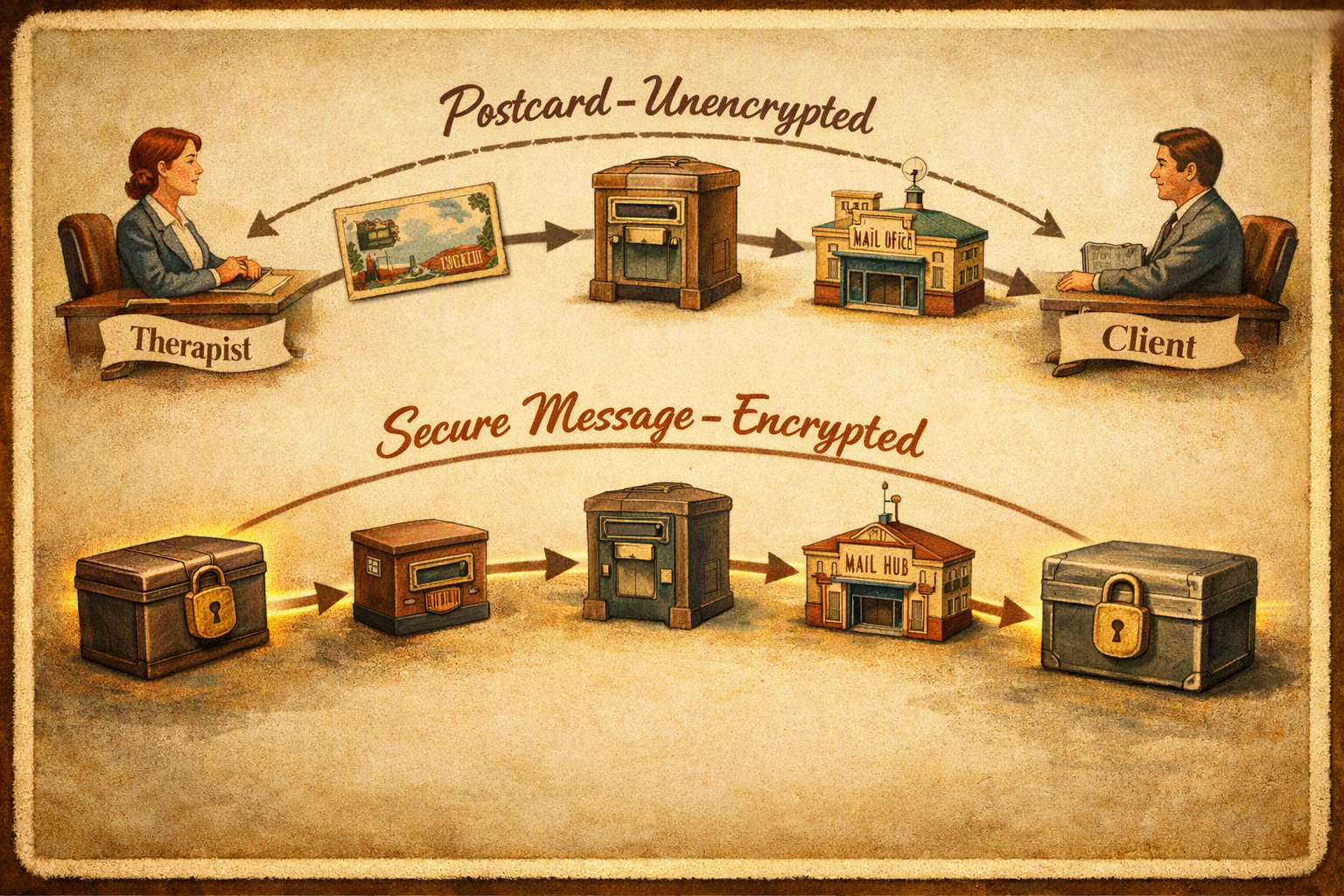
Encryption turns a readable message into scrambled nonsense. Only someone holding the right key can turn it back.
Think of it as moving your postcard into a locked box. The box can travel through any number of hands. Anyone who intercepts it sees only a locked box.
There are three ideas worth knowing:
- Encryption in transit protects a message while it travels between computers. Picture the postcard riding in a locked truck between post offices.
- Encryption at rest protects a message while it is stored on a server or device. Picture the postcard filed in a locked cabinet.
- End-to-end encryption means only the sender and the intended recipient hold the keys. Not the email company, not the server, not anyone in between. Picture a locked box that only you and your client can open.
So why isn't email encrypted?
To be fair to email, most major providers now use encryption in transit between their servers. The truck is often locked.
The trouble is what happens at each post office along the way. Every mail server that handles the message can open it, read it, and keep a copy. If any server on the route doesn't support the locked truck, the message may travel unprotected for that leg. You won't be told.
Once the email lands, it usually sits readable in the client's inbox, the provider's systems, backups, and every device synced to that account. You also cannot recall it once it is sent.
In short: email may ride in a locked truck, but it is still a postcard. A secure client portal keeps the message in a locked box for the whole trip and stores it in a locked vault. To be precise, most portals hold the keys on your behalf, so they aren't end to end in the strict sense above. Think of a vault you've contracted, with a signed agreement about who may open it. That is still a world away from a postcard.
You lock your mailbox. Do they?

Many therapists do good work securing their own side: a professional account, a strong password, two-factor authentication, an encrypted laptop.
That matters. It just isn't the whole route.
Your safeguards end where the client's inbox begins. Once a message arrives, it is protected only as well as the client protects it, and you have no way to verify that. Common gaps include:
- Shared devices. A family tablet, a partner's laptop, a shared home computer.
- Shared or known passwords. Partners, parents, or adult children who can log in.
- Work email. Employers can often access accounts on their own systems.
- Lock-screen previews. The first lines of a message appear on a phone sitting on the table.
- Auto-forwarding and syncing. One message quietly copied to several accounts and devices.
- Mistyped addresses. One wrong letter, and a stranger receives it.
For some clients, the stakes are higher. When safety at home is a concern, an inbox someone else can open is a real risk to the client, not a theoretical one.
A secure portal changes this. Clients log in to read messages, and the notification email they receive says only that a new message is waiting. The postcard becomes a note that reads, "There's a locked box for you at the front desk."
Why Canadian servers matter (and why location isn't the whole story)
Every postcard gets sorted somewhere. Whoever runs the sorting facility follows the laws of their own country.
Many popular email and cloud services are owned by American companies. That brings Canadian client information within reach of US legal tools that Canadian clients never agreed to and Canadian courts don't oversee. Three are worth knowing:
- The US CLOUD Act (2018). It lets US authorities compel US-based companies to hand over data in their "possession, custody, or control", wherever in the world it is physically stored. US legal process is still involved, but there is no Canadian judicial review and no requirement to notify the person whose data is taken.
- FISA Section 702. This US foreign-intelligence authority permits collecting the communications of non-US persons outside the United States without an individual warrant. Canadians have no US constitutional protection here. The statute's renewal has been politically contested in 2026, but court-approved certifications for the program reportedly run into 2027.
- Border device searches. US Customs and Border Protection, part of the Department of Homeland Security (DHS), can search phones and laptops at the border without a warrant. If your email app holds client correspondence, that correspondence crosses the border with you.
None of this means anyone is reading your clients' mail. It means that, on a US-controlled service, you can't promise them nobody can.
Residency versus sovereignty
Here is the subtle part. "Our servers are in Canada" answers where the data sits. It doesn't answer who controls it. A Canadian data centre run by a US-owned company may still be reachable under the CLOUD Act.
When you evaluate any platform, ask two questions:
- Where is client data stored, including backups?
- Who owns and controls the company, and its hosting provider?
To be precise about the law: PHIPA does not flatly prohibit storing PHI outside Canada. It asks whether your safeguards are reasonable in the circumstances. For many therapists, Canadian storage with a Canadian-controlled provider is the most straightforward way to answer that question well, and the easiest to explain to clients.
When email is fine: best practices for scheduling
Email still has a place. CRPO's own example of appropriate use is booking appointments. Postcards are perfectly good for "See you Tuesday at 2." These habits keep that use tidy:
- Get informed consent at intake. Explain that email is for scheduling only, that it is not secure, and what you use for everything else. Document the client's consent.
- Keep it logistical. Dates, times, links, reminders. No diagnoses, session content, worksheets, or how-are-you-holding-up check-ins.
- Use neutral subject lines. "Appointment confirmation" rather than "Your anxiety session."
- Use a professional account with a strong password and two-factor authentication, never a personal one.
- Double-check the address before sending, especially with autocomplete.
- Redirect clinical replies. When a client emails something clinical, reply briefly, invite them to continue in the secure portal, and add the original to the record.
- Add a standard footer with a confidentiality notice, instructions for misdirected messages, and crisis information.
- Think about your devices when travelling, especially across the border.
Sample email footer
Adapt this to your practice and review it against your own policies:
Confidentiality notice: Email is not a secure method of communication. Please use it for scheduling only, and share personal or clinical information through our secure client portal. This message is intended only for the named recipient. If you received it in error, please let us know, delete it, and securely destroy (shred) any printed copies.
This inbox is not monitored for emergencies, and we are not a crisis service. If you are in crisis, call or text 9-8-8 (Suicide Crisis Helpline, available 24/7 across Canada), call 911, or go to your nearest emergency department.
A footer is a courtesy and a clear statement of your policy. It is not, by itself, a security measure. It doesn't make email secure, and it doesn't replace consent.
Better options for anything clinical

For worksheets, homework, session summaries, and between-session messages, a secure platform is the locked box in a contracted vault. The examples below are commonly used by Canadian therapists. They are illustrations, not endorsements: CRPO doesn't recommend specific platforms, Vistas uses Owl messaging, but has no affiliation with any of these companies, and features change, so confirm current details with each vendor.
Tool
What it is
Data storage (per the vendor)
Lands in the client file automatically?
Practice management with built-in secure messaging
Montréal for Canadian accounts
Messages connect to client profiles and charts
Practice management with a secure client portal
Servers in Montréal and Toronto
Secure messages are part of the client file
Encrypted email and secure forms
Canada; an information manager agreement is provided
Save copies to the record yourself
Secure file sharing and messaging
Canada, among other residency options
No, save copies to the record yourself
The bonus nobody mentions: less charting
Remember Standard 3.4.6? Treatment-related written communication belongs in the clinical record.
With ordinary email, that means saving, printing, or copying each relevant message into the chart by hand. Done properly, it is a steady, invisible admin task. Done improperly, it leaves part of the record scattered across an inbox.
When messaging is built into your practice-management system, each message is attached to the client's file as it's sent. The record keeps itself. That is a privacy improvement and a meaningful reduction in administrative load, which is a rare pairing.
Standalone encrypted tools like Hushmail and TitanFile solve the security problem very well. They don't solve the filing problem, so build a routine for moving correspondence into the chart.
A quick self-check
- My intake consent explains what email is used for, and what it isn't.
- Email to clients is limited to scheduling and logistics.
- Clinical content goes through an encrypted platform.
- I know where my platforms store data, and who owns them.
- My email footer includes a confidentiality notice and crisis information.
- Client correspondence with clinical content is in the record.
- I've completed CRPO's Security Practices Checklist recently.
Back to the postcard
None of this is about fear, and none of it requires becoming a tech person. It is the same judgment you use in the therapy room, applied to the mail.
Postcards are lovely. Send them for appointment reminders.
For everything your clients trust you with, use the locked box.
Purpose and scope
This post is for informational and educational purposes only. It offers a general overview of CRPO standards, Ontario and federal privacy legislation, and relevant US law. It is not legal advice or a legal opinion, and it is not clinical supervision or a substitute for it. If you have a clinical supervisor, consult them before making changes to your practice.
Regulatory compliance is an individual professional responsibility. Each clinician must verify how these requirements apply to their own registration, practice setting, and the platforms they use.
Laws, regulatory policies, and vendor features can change without notice. This post was last reviewed in October 2026. Please confirm current requirements with CRPO, the IPC, and your vendors directly.
Privacy and electronic communication are ongoing parts of responsible clinical practice. If you're reviewing how your practice handles email, secure messaging, documentation, or other aspects of electronic practice, professional consultation can provide a space to think through your approach alongside the relevant standards and your practice context.
At Vistas Wellness, we offer clinical supervision and consultation for therapists, including support for clinicians who are developing or refining their practice.
Explore clinical supervision and consultation at Vistas Wellness or contact us to learn more.
This content is written for therapists. It is not therapy, and it does not establish a therapeutic, supervisory, or consultative relationship.
If you're experiencing distress, please reach out to a qualified mental health professional. If you are in immediate distress or at risk of harm, in Canada you can call or text 9-8-8 or call 9-1-1. Outside Canada, FindAHelpline.com lists free, confidential support in your region.
Sources and further reading
- College of Registered Psychotherapists of Ontario. Standard 3.1: Confidentiality.
- College of Registered Psychotherapists of Ontario. Standard 3.4: Electronic Practice.
- College of Registered Psychotherapists of Ontario. Selecting a Communications Platform for Electronic Practice.
- College of Registered Psychotherapists of Ontario. Security Practices Checklist for Electronic Practice.
- Information and Privacy Commissioner of Ontario. (2016). Communicating Personal Health Information by Email [Fact sheet].
- Canadian Counselling and Psychotherapy Association, Technology and Innovative Solutions Chapter. Guidelines for the Uses of Technology in Counselling & Psychotherapy.
- Ontario Psychological Association. Guidelines for Best Practices in Electronic Communications.
- Personal Health Information Protection Act, 2004, S.O. 2004, c. 3, Sched. A, ss. 4 and 12.
- Personal Information Protection and Electronic Documents Act, S.C. 2000, c. 5, Schedule 1, Principle 4.7 (Safeguards).
- Balsillie Papers. (2026). Whose Law Governs Canadian Data? The CLOUD Act, Executive Agreements and Digital Sovereignty.
- Brookings Institution. (2026, February 10). A key intelligence law expires in April and the path for reauthorization is unclear.
- Electronic Privacy Information Center. (2026, June 11). FISA Section 702 almost certain to expire after House votes against extension.
Frequently Asked Questions
Is email safe for therapists to use with clients?
Ordinary email is not considered a fully secure method for communicating confidential clinical information. CRPO advises registrants to avoid non-secure communication methods such as email for confidential information unless the client has consented to the risk and there is no practical alternative. Therapists should consider using a secure client portal or other appropriate secure platform for clinical communication.
Can therapists use email for appointment scheduling?
Yes. Email can be appropriate for scheduling and other basic logistics when the client has provided informed consent and the therapist has appropriate safeguards in place. CRPO's electronic practice guidance gives appointment booking as an example of an appropriate use of email. Therapists should avoid including diagnoses, session content, clinical worksheets, or other sensitive treatment information in ordinary email.
Do therapists need client consent to communicate by email?
Therapists should obtain informed consent for the specific electronic media they use to provide services. For non-secure communication such as ordinary email, consent does not necessarily make the communication appropriate on its own: CRPO's confidentiality standard also refers to there being no practical alternative. Clients should understand the potential privacy and security risks associated with the technology.
Is regular email encrypted?
Most major email providers use encryption in transit between servers, but ordinary email is not necessarily end-to-end encrypted. Messages may also be stored in email accounts, backups, servers, and synced devices. Because therapists cannot control how a client's email account or devices are secured, ordinary email does not provide the same level of control as a secure client portal.
Can therapists send therapy worksheets or session summaries by email?
Clinical materials such as worksheets, homework, session summaries, and treatment-related messages contain personal health information and should generally be sent through an appropriate secure platform rather than ordinary email. A secure client portal can also make it easier to keep treatment-related written communication connected to the client's clinical record.
Does PHIPA apply to therapists' emails?
For Ontario Registered Psychotherapists who are health information custodians, PHIPA applies to personal health information in their custody or control, including information held in email systems. PHIPA requires custodians to take reasonable steps to protect personal health information against theft, loss, unauthorized use, or unauthorized disclosure.
Does it matter where a therapist's client data is stored?
Yes. Therapists should consider both where client information and backups are stored and who owns or controls the company providing the technology. Data stored by a U.S.-controlled company may be subject to U.S. legal requirements even when the physical servers are located in Canada. Canadian data residency and company ownership are therefore separate questions when evaluating a platform.
What should therapists use instead of email for clinical communication?
A secure client portal or secure messaging system integrated with practice-management software can be a practical alternative for clinical communication. Depending on the platform, secure messaging may also connect directly to the client's clinical file, reducing the administrative work involved in transferring treatment-related correspondence into the record. Therapists should evaluate each platform's security, data storage, ownership, privacy terms, and current features before choosing it.